Hi-Res Whole House Audio with Lyrion Music Server, PiCorePlayer, and WIIM
Table of Contents
Walk into any room in my house and the same music is playing — perfectly in sync, no echo, no delay. Kitchen, bedroom, upstairs, downstairs, living room, dining room. One song, everywhere, at the same moment.
That’s the easy part to describe. The harder part: every note is arriving at exactly the quality it was recorded. 24-bit/192kHz FLAC from my local library, uncompressed, unmodified, untouched by any resampling engine. The way the artist and engineer heard it in the studio.
Most whole-house audio systems can’t say that. Sonos caps audio at 24-bit/48kHz — you pay premium prices for the hardware and a hi-res streaming subscription, and it quietly resamples everything before it reaches your speakers. You never hear what you paid for.
I wanted more. Audiophile-grade Sonance in-ceiling speakers in every room. Real 12-channel amplifiers with real power. A music server that streams hi-res files unmodified and handles Tidal, Spotify, internet radio, and podcasts from a single interface — with synchronized playback across the whole house.
So I built it. This post is the complete guide to how.
This post walks through the complete architecture, how everything connects, and how I play my local Hi-Res library alongside Tidal and Spotify streaming.
The Stack at a Glance #
Before diving into the details, here’s every component in the chain:
| Layer | Component | Role |
|---|---|---|
| Music Server | Lyrion Music Server (LMS) | Central brain — indexes library, streams to players |
| Host | Synology NAS (Docker container) | Runs LMS 24/7 without dedicated hardware |
| Controller | PiCorePlayer on Raspberry Pi 4 | Wall-mounted touchscreen — controls LMS, displays now-playing |
| Display | 7" Raspberry Pi touchscreen | Jivelite UI — browse library, control playback by touch |
| Power | PoE on Raspberry Pi | Single ethernet cable per Pi — no power brick |
| Synchronization | WIIM Pro (×2) | Receives stream, feeds both amplifiers in sync |
| Amplifiers | AudioSource AD5012 (×2) | 12-channel Class D, drives all speaker zones |
| Zone control | OSD Audio SVC-300 (per zone) | In-wall volume knob per zone |
| In-ceiling speakers | Sonance MAG8R (8" 2-way) | Hi-res capable, 40Hz–20kHz, 90dB |
| Subwoofers | Sonance BPS8 (bandpass) | Low-end reinforcement, 35Hz–150Hz |
| Streaming | LMS plugins | Tidal, Spotify via built-in plugins |
How It All Connects #
Lyrion Music Server
Hi-res library · Tidal · Spotify"] PI1["Raspberry Pi 1
PiCorePlayer
PoE + 7in Touchscreen"] PI2["Raspberry Pi 2
PiCorePlayer
PoE + 7in Touchscreen"] WIIM1["WIIM Pro 1
Hi-Res DAC
32-bit / 384kHz"] WIIM2["WIIM Pro 2
Hi-Res DAC
32-bit / 384kHz"] AMP1["AudioSource AD5012 1
12-Channel Class D
50W per channel"] AMP2["AudioSource AD5012 2
12-Channel Class D
50W per channel"] VOL1["OSD SVC-300
In-wall volume"] VOL2["OSD SVC-300
In-wall volume"] VOL3["OSD SVC-300
In-wall volume"] VOL4["OSD SVC-300
In-wall volume"] VOL5["OSD SVC-300
In-wall volume"] Z1["Zone 1
Main Bedroom + Restroom
4 speakers"] Z2["Zone 2
Upstairs Corridor + Stairs
4 speakers"] Z3["Zone 3
Downstairs Corridor + Dining
4 speakers"] Z4["Zone 4
Kitchen
4 speakers"] Z5["Zone 5
Living Room
4 speakers"] SPK["Sonance MAG8R
8in In-Ceiling Speakers
+ BPS8 Subwoofers"] PI1 -.->|"control"| NAS PI2 -.->|"control"| NAS NAS -->|"LAN audio stream sync group"| WIIM1 NAS -->|"LAN audio stream sync group"| WIIM2 WIIM1 -->|"Analog out"| AMP1 WIIM2 -->|"Analog out"| AMP2 AMP1 --> VOL1 --> Z1 --> SPK AMP1 --> VOL2 --> Z2 --> SPK AMP1 --> VOL3 --> Z3 --> SPK AMP2 --> VOL4 --> Z4 --> SPK AMP2 --> VOL5 --> Z5 --> SPK style NAS fill:#1a73e8,color:#fff style PI1 fill:#34a853,color:#fff style PI2 fill:#34a853,color:#fff style WIIM1 fill:#ff6d00,color:#fff style WIIM2 fill:#ff6d00,color:#fff style AMP1 fill:#9c27b0,color:#fff style AMP2 fill:#9c27b0,color:#fff style VOL1 fill:#607d8b,color:#fff style VOL2 fill:#607d8b,color:#fff style VOL3 fill:#607d8b,color:#fff style VOL4 fill:#607d8b,color:#fff style VOL5 fill:#607d8b,color:#fff style Z1 fill:#263238,color:#fff style Z2 fill:#263238,color:#fff style Z3 fill:#263238,color:#fff style Z4 fill:#263238,color:#fff style Z5 fill:#263238,color:#fff style SPK fill:#4e342e,color:#fff
The key design insight: LMS streams directly to the WIIM Pro players, AudioSource AD5012 handles zones. LMS treats the two WIIM players as a synchronized group — it streams the same timing-locked audio to both simultaneously over the LAN. The Raspberry Pi touchscreens act purely as controllers: they send commands to LMS (play, pause, skip, volume) and display what’s playing, but audio never passes through them. Each WIIM Pro feeds one AD5012 amplifier, whose 12 channels distribute audio across the house — with the per-zone OSD volume controls letting you independently adjust the level in each room.
Lyrion Music Server on Synology (Docker) #
Lyrion Music Server (formerly Logitech Media Server) is the heart of the whole system. It runs as a Docker container on my Synology NAS, which means it runs 24/7 without spinning up a dedicated machine.
Docker Compose Setup #
version: "3"
services:
  lyrion:
    image: lmscommunity/lyrionmusicserver:latest
    container_name: lyrion
    network_mode: host        # required for player discovery (mDNS/UDP broadcasts)
    volumes:
      - /volume1/docker/lyrion/config:/config
      - /volume1/music:/music:ro          # your music library (read-only)
      - /volume1/docker/lyrion/playlist:/playlist
    environment:
      - PUID=1026               # match your Synology user
      - PGID=100
      - TZ=America/Los_Angeles
    restart: unless-stopped
Why network_mode: host? LMS uses UDP broadcasts for player discovery. Bridge networking blocks these broadcasts, so players can’t find the server. Host networking is the simplest fix.
Once the container is running, LMS is accessible at http://your-nas-ip:9000.
LMS Web Interface #
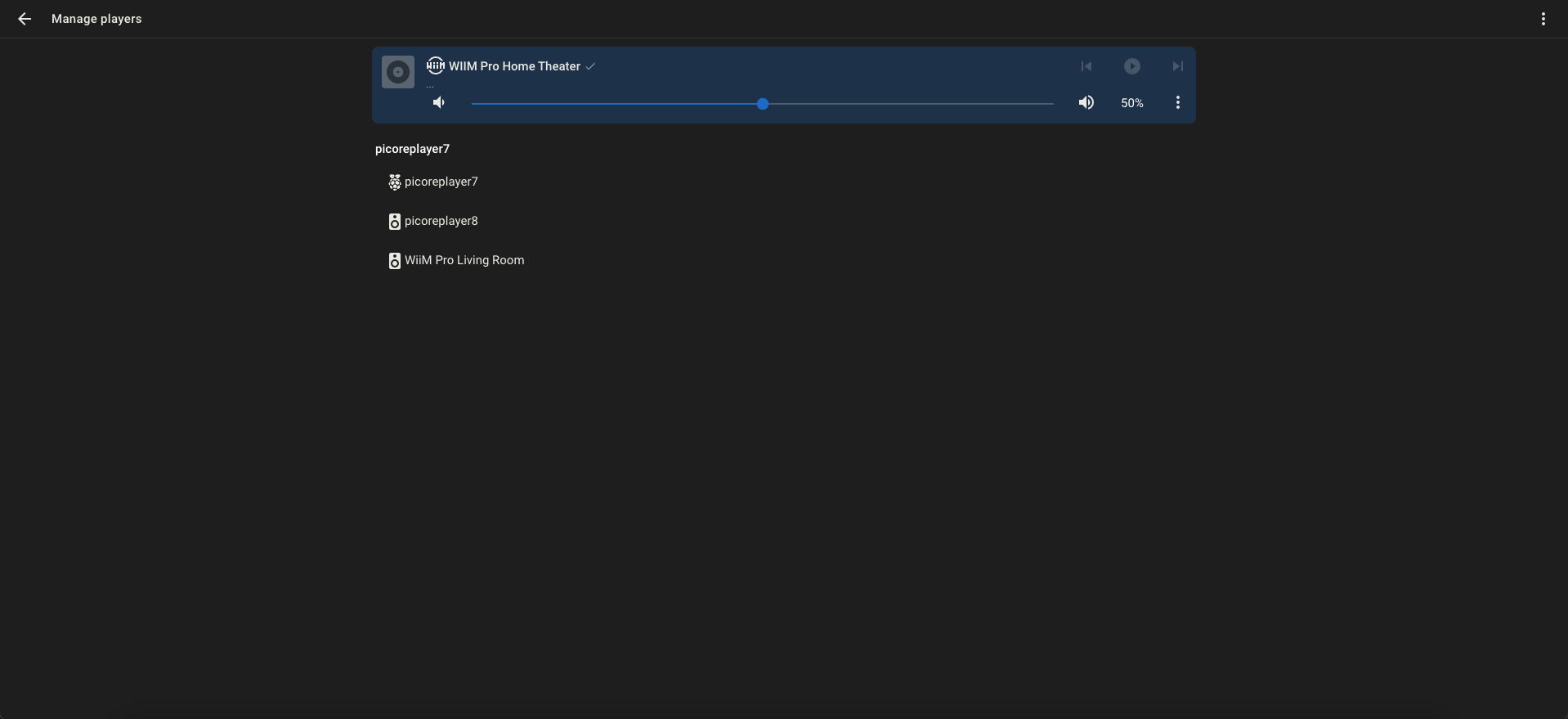
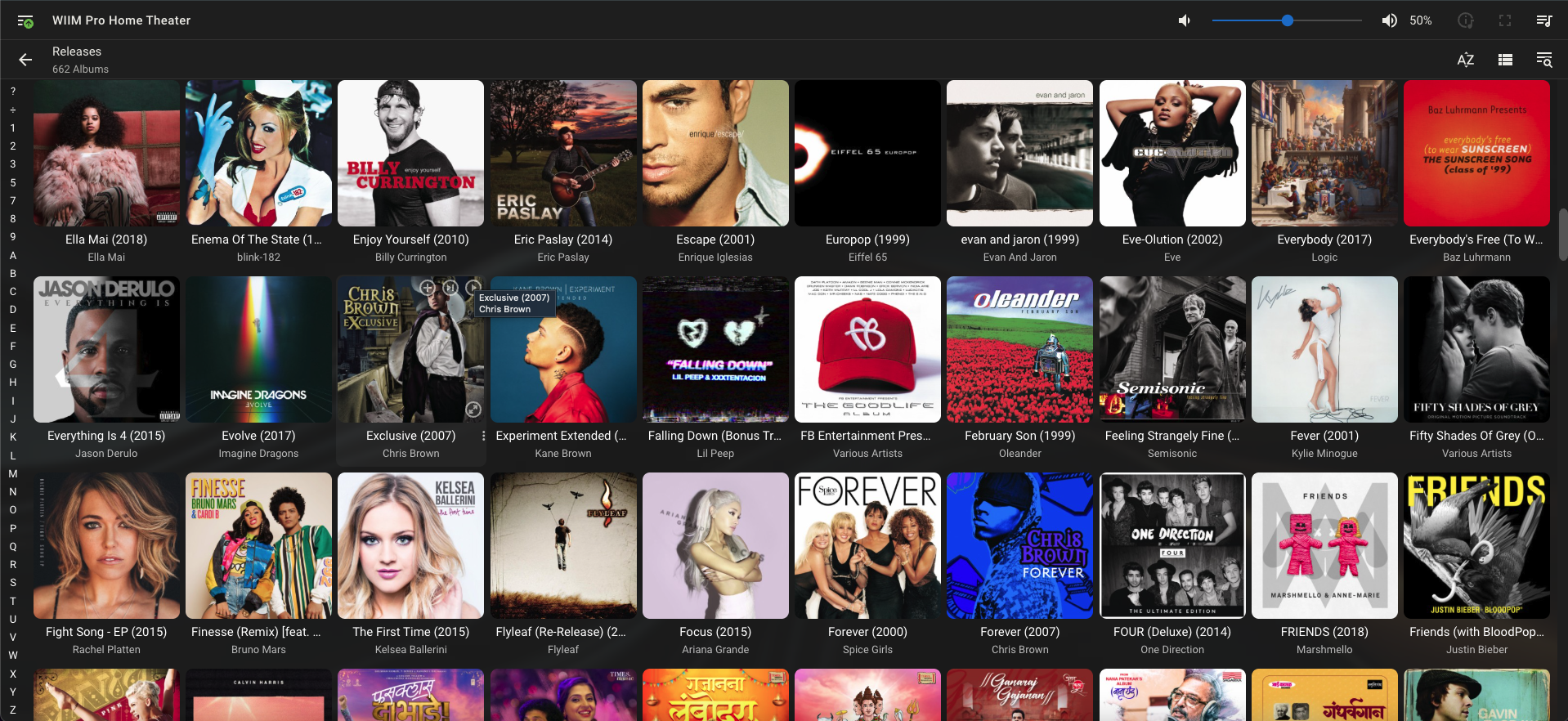
The dashboard shows every connected player, what’s currently playing, and lets you group players for synchronized playback. The left sidebar gives you your full library — artists, albums, genres, playlists.
Music Library Setup #
Point LMS at your music folder during initial setup. It scans and indexes everything — album art, tags, the works. For a library of 10,000+ tracks the initial scan takes a few minutes; after that it monitors for changes automatically.
PiCorePlayer on Raspberry Pi #
PiCorePlayer is a minimal Linux distribution built around Squeezelite and Jivelite. In this setup it acts as a wall-mounted controller: it connects to LMS over the network, displays album art and playback information on the 7" touchscreen, and lets you browse and control the music by touch. Audio doesn’t pass through the Pi — LMS streams directly to the WIIM players. The Pi’s job is purely control and display.
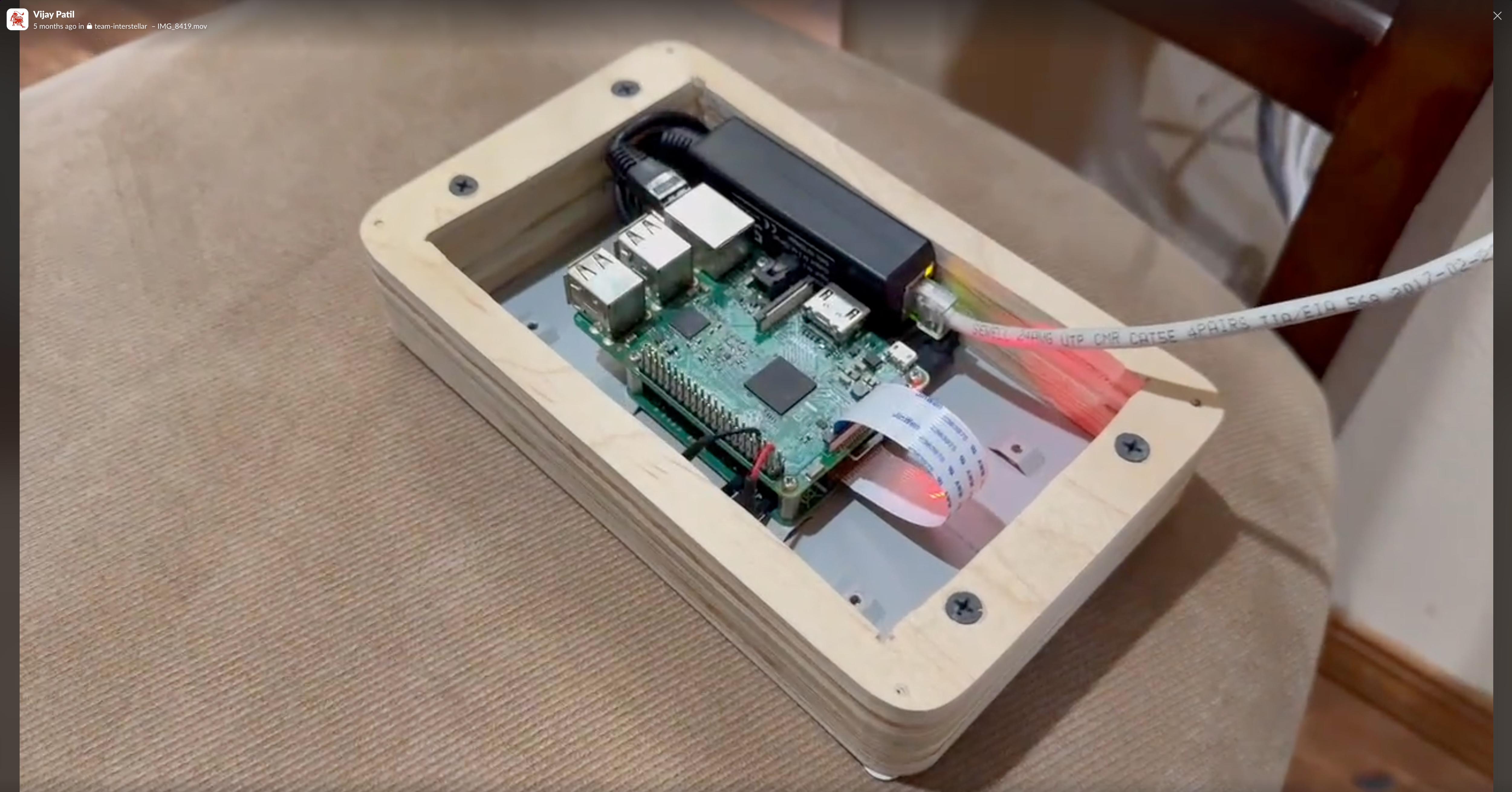
Hardware Per Pi #
- Raspberry Pi 4 (2GB or 4GB)
- PoE HAT — powers the Pi directly from the ethernet cable, no separate power supply
- Official 7" Raspberry Pi touchscreen
- MicroSD card (8GB is plenty — PiCorePlayer is tiny)
The PoE setup is the cleanest part of this build. One ethernet cable per Pi, plugged into a PoE switch. No power bricks, no cable management headaches. The Pi gets data and power over a single cable.
PiCorePlayer Setup #
Flash the PiCorePlayer image to the SD card (balenaEtcher works well), boot the Pi, and it auto-detects LMS on the network. The web interface at http://pi-ip-address gives you full configuration:
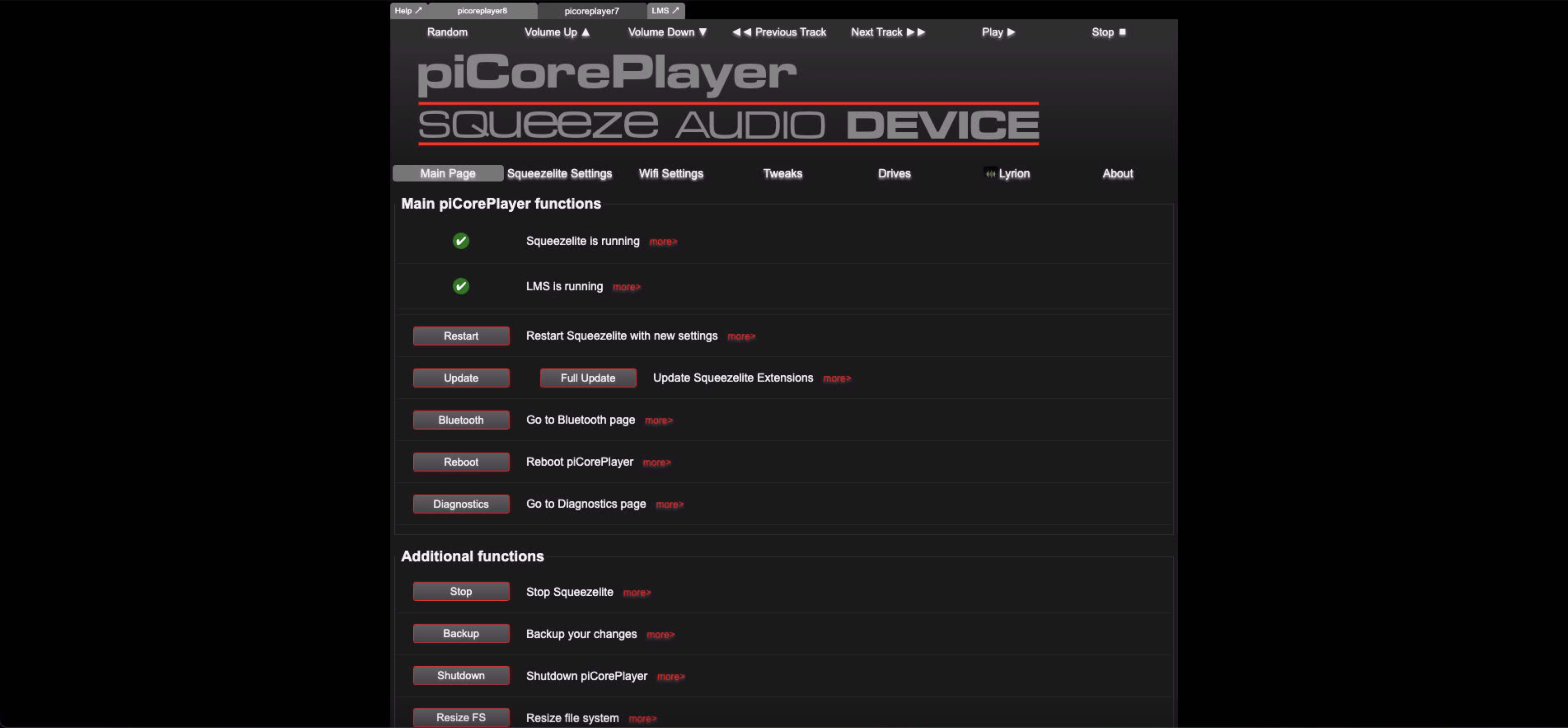
Key settings to configure:
- Player name — give each Pi a meaningful name (Kitchen, Hallway, etc.)
- Audio output — select the correct output device (HDMI, USB DAC, or 3.5mm)
- LMS server — usually auto-discovered; can be set manually by IP
The Touchscreen #
The 7" touchscreen runs Jivelite — the graphical front-end for Squeezebox players. It shows album art, track info, playback controls, and lets you browse your entire library by touch.
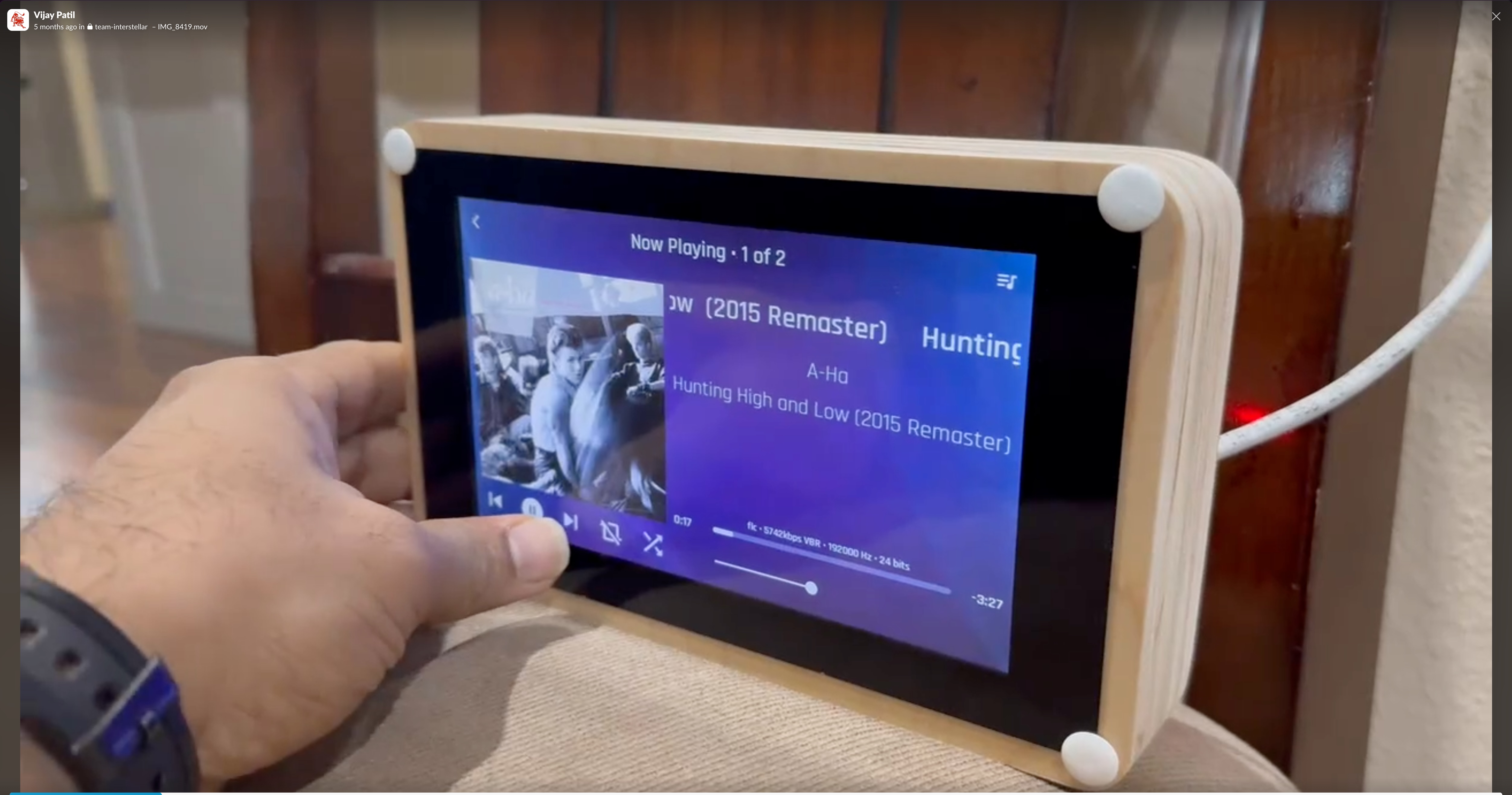
This is what makes the system genuinely usable day-to-day. Instead of pulling out your phone to change a track, you tap the screen on the wall. The display shows album art, track info including track format, bitrate and sampling information and full playback controls.
WIIM Pro: Synchronization Bridge #
The two WIIM Pro players are the audio endpoint in this system. LMS streams hi-res audio directly to them over the LAN — the Raspberry Pis don’t carry audio at all when I am playing local music files. The critical role the WIIMs play is not zone management — that’s handled by the amplifiers — but receiving the timing-synchronized stream from LMS and outputting analog audio to the amplifiers.
LMS groups both WIIM players together as a synchronized pair and streams the same timing-locked audio to both simultaneously. This is what makes music in the upstairs corridor match exactly what’s playing in the kitchen — both amplifiers are fed the same signal at the same moment. You also get LMS-level volume control across the synchronized group from any controller (the touchscreen, the web UI, or the mobile app), which is more convenient than adjusting the amplifiers directly.
AudioSource AD5012: 12-Channel Amplifier #
Each WIIM Pro feeds one AudioSource AD5012 — a 12-channel Class D amplifier designed specifically for whole-house distributed audio. With two AD5012s in the setup, there are 24 amplified channels total, organized into the speaker zones throughout the house.
| Specification | Value |
|---|---|
| Channels | 12 (6 stereo pairs) |
| Power output | 50W/channel @ 8Ω |
| Power output | 75W/channel @ 4Ω |
| Bridged mono | 125W @ 8Ω |
| Frequency response | 20Hz – 20kHz ±0dB |
| THD+N | <0.2% |
| Signal-to-noise ratio | 100dB (A-weighted) |
| Channel separation | 65dB @ 1kHz |
The Class D design means the AD5012 runs cool and efficiently even with 12 channels active — important for a unit that’s running 24/7 in a rack or closet. The optical PCM input is particularly useful: it accepts the digital signal directly, skipping an extra analog conversion stage.
Speaker Zones #
The 12 channels on each AD5012 are organized into stereo zones. The five whole-house zones, and what’s in each:
| Zone | Rooms | Speakers |
|---|---|---|
| Zone 1 | Main Bedroom + Main Restroom | 4 speakers |
| Zone 2 | Upstairs Corridor + Stairs | 4 speakers |
| Zone 3 | Downstairs Corridor + Dining Room | 4 speakers (2 + 2) |
| Zone 4 | Kitchen | 4 speakers |
| Zone 5 | Living Room | 4 speakers |
Each zone draws 2 channels from an AD5012 (one stereo pair). With 20 speakers across 5 zones, the two AD5012s together cover the entire house.
OSD Audio SVC-300: Per-Zone Volume Control #
Volume in each zone is controlled independently using the OSD Audio SVC-300 in-wall volume control — one per zone, mounted in the wall like a light switch.
| Specification | Value |
|---|---|
| Power handling | 300W peak / 150W RMS per channel |
| Frequency response | 20Hz – 20kHz |
| Attenuation range | 52dB (12-step rotary knob) |
| Impedance matching | 1, 2, 4, 6, or 8 speaker pairs |
The SVC-300 sits between the amplifier output and the speakers for each zone. Turning the knob attenuates the signal in 12 steps across 52dB of range — enough to go from full volume to nearly silent. The impedance matching feature matters when running multiple speakers per zone: it prevents the amplifier from seeing an impedance load that’s too low.
The practical result: you can walk into the kitchen and turn the volume down without touching a phone, app, or the amplifier itself. Each room behaves independently even though all rooms are playing the same synchronized source.
Synchronized Playback #
This is the killer feature — and it’s achieved by grouping both WIIM Pro players together in LMS as a synchronized pair.
LMS sends the same timing-locked audio stream to both WIIM players simultaneously. This timing lock is what keeps the upstairs corridor in perfect step with the kitchen, the dining room, the bedroom — every zone. Walk anywhere in the house and the music is identical, with zero echo or delay between rooms.
The AudioSource AD5012 amplifiers play no role in synchronization. They simply amplify whatever the WIIM Pro feeds them and distribute it across their 12 channels. The sync happens upstream in LMS, before the signal ever reaches the amps.
The LMS sync group also gives you a single volume control across both players — adjust volume from the touchscreen or the LMS web interface and both WIIMs respond together. Per-room fine-tuning is still available via the OSD SVC-300 wall knobs, but the overall level is managed from LMS. This is something proprietary whole-house audio systems charge thousands of dollars for.
In-Ceiling Speakers: Sonance MAG Series #
The speakers are the final link in the chain, and they’re worth choosing carefully — especially when the rest of the system is capable of delivering hi-res audio. I use Sonance MAG series speakers throughout the house: the MAG8R for main in-ceiling coverage and the BPS8 bandpass subwoofer for low-end reinforcement.
Sonance MAG8R — 8" 2-Way In-Ceiling Speaker #
The MAG8R is an audiophile-grade in-ceiling speaker designed for high-fidelity music playback, not just background fill. The 8" woofer gives it enough cone area to reproduce lower midrange with real body, and the pivoting tweeter lets you aim the high-frequency dispersion toward the listening area rather than straight down at the floor.
| Specification | Value |
|---|---|
| Frequency response | 40Hz – 20kHz |
| Sensitivity | 90dB (1W/1m) |
| Impedance | 8Ω |
| Power handling | 100W continuous |
The 90dB sensitivity means it produces 90dB of output from just 1 watt — efficient enough that the 12-channel amplifier doesn’t have to work hard to reach comfortable listening levels. At hi-res listening volumes, these are genuinely musical speakers, not just “ceiling speakers.”
Sonance BPS8 — 8" Passive Bandpass In-Ceiling Subwoofer #
The BPS8 is a bandpass subwoofer designed specifically for in-ceiling installation. The bandpass enclosure design filters the output to a tight low-frequency band — it only reproduces what a standard in-ceiling speaker can’t: the real bottom end. This pairing is what makes hi-res playback of bass-heavy material (orchestral, electronic, jazz) feel physically present rather than just acoustically correct.
| Specification | Value |
|---|---|
| Frequency response | 35Hz – 150Hz (bandpass filtered) |
| Sensitivity | 88dB (1W/1m) |
| Impedance | 8Ω |
| Power handling | 150W continuous |
The BPS8 pairs with the 12-channel amplifier — two channels per subwoofer or one dedicated channel depending on your amplifier layout. The bandpass design means you don’t need a crossover network: it naturally rolls off above 150Hz, handing off cleanly to the MAG8Rs for everything above that.
Why This Speaker Choice Matters for Hi-Res #
Most in-ceiling speakers are designed for speech intelligibility and background music. The MAG series is designed for music. The combination of the MAG8R’s extended high-frequency response to 20kHz and the BPS8’s low extension to 35Hz covers the full audible spectrum — the same range that hi-res recordings at 24-bit/192kHz actually contain information in.
Playing a 24-bit/192kHz FLAC through a system that caps at 16kHz and rolls off below 80Hz defeats the purpose of the entire chain above it. The Sonance MAG series is what makes the hi-res investment audible.
Streaming Services: Tidal and Spotify #
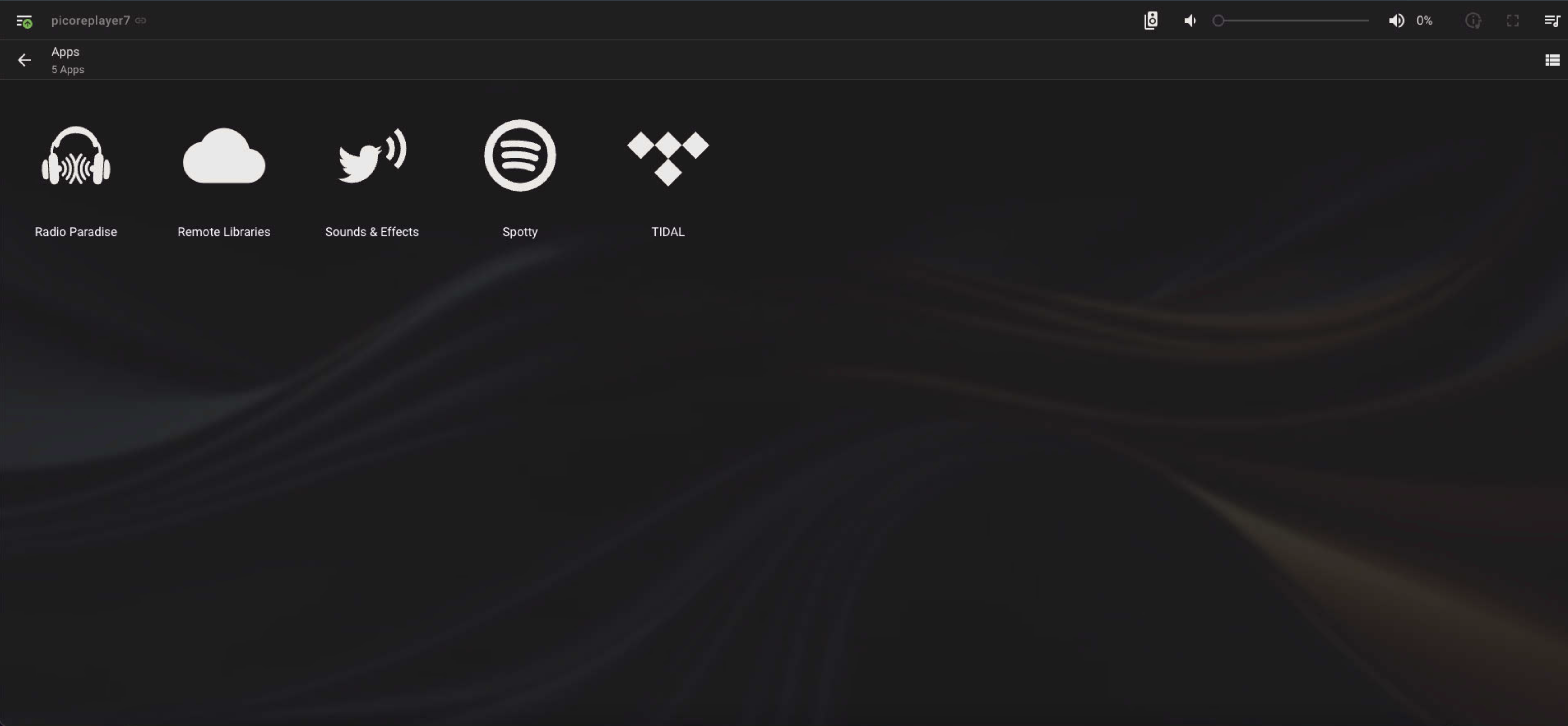
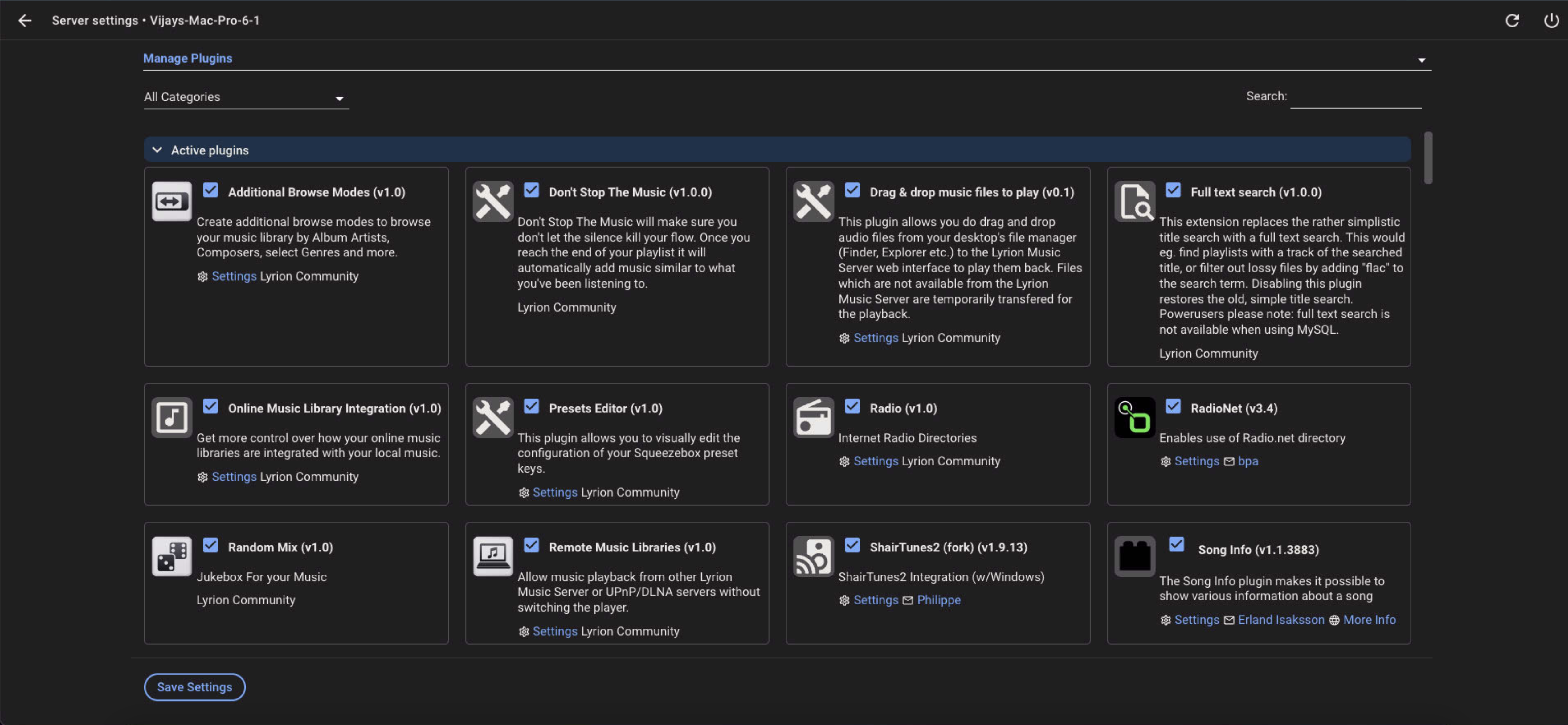
LMS has a plugin ecosystem, and the streaming service plugins are genuinely excellent. They appear as first-class library items inside LMS — no need to switch apps.
Tidal #
The Tidal plugin supports Tidal Connect as well as direct library integration. Hi-res FLAC streams if you have a Tidal HiFi subscription — and with the WIIM players handling DAC duties, you’re actually getting the benefit of those high-resolution files.
Spotify #
The Spotify plugin works with Spotify Connect, so it shows up as a playback target in the Spotify app as well as being browsable from within LMS.
Installing Plugins #
Both plugins install from the LMS plugin manager — no manual file copying needed:
- In LMS web interface, go to Settings → Plugins
- Search for the plugin by name
- Click Install, restart LMS
- Enter your service credentials in the plugin settings
Hi-Res Audio: The Real Reason to Build This #
This is the aspect that most whole-house audio comparisons gloss over, and it’s the main reason I built this system instead of buying something off the shelf.
Proprietary systems like Sonos cap out at 24-bit/48kHz. That’s CD-quality at best — fine, but not what you’re getting from a high-resolution music library or a Tidal HiFi subscription streaming 24-bit/192kHz FLAC. The hardware is simply incapable of passing those files through at full quality.
This setup doesn’t have that limitation.
Lyrion Music Server: Full Hi-Res Passthrough #
LMS serves audio files natively — it doesn’t transcode or downsample unless you tell it to. What’s on disk is what gets sent to the player:
| Format | Support |
|---|---|
| FLAC | Up to 32-bit / 384kHz |
| WAV / AIFF | Up to 32-bit / 384kHz |
| ALAC | Up to 24-bit / 192kHz |
| MP3, AAC, OGG | Standard lossy formats |
| DSD64 / DSD128 | Native DSD or DSD-over-PCM (DoP) |
| MQA | Via Tidal plugin (unfolds to 24-bit/96kHz) |
The key setting is in LMS under Settings → Player → Audio: ensure the output bitrate and sample rate are set to “keep original” rather than any fixed rate. LMS will then pass through whatever the source file contains, including gapless playback for albums where tracks run continuously.
WIIM Pro: Hi-Res DAC #
The WIIM Pro is certified for hi-res audio playback and handles the digital-to-analog conversion at the end of the chain:
| Capability | Specification |
|---|---|
| PCM playback | Up to 32-bit / 384kHz |
| DSD playback | DSD64 and DSD128 via DoP |
| Output | Optical (TOSLINK), coaxial S/PDIF, analog RCA |
| DAC chip | Supports 32-bit processing |
| Hi-Res certification | Hi-Res Audio certified |
The optical and coaxial outputs pass the digital signal directly to an external DAC or amplifier, letting you use your own DAC if you prefer. The analog RCA outputs use the WIIM’s internal DAC — which is genuinely good for the price.
The Full Chain at 24-bit/192kHz #
FLAC file on NAS (24-bit/192kHz)
  → LMS (passes through unmodified)
    → WIIM Pro (receives stream directly from LMS, decodes, outputs 24-bit/192kHz)
      → AudioSource AD5012 (amplifies, distributes to zones)
        → OSD SVC-300 (per-zone volume) → Sonance MAG8R / BPS8 speakers

  [Raspberry Pi / PiCorePlayer = touchscreen controller only, not in audio path]
Every link in the audio path is capable of handling the full resolution. Nothing throttles it. The Raspberry Pi touchscreens sit outside this chain entirely — they send control commands to LMS (play, pause, volume, track selection) but carry no audio signal.
Compare this to Sonos, which resamples everything to 16-bit/48kHz internally, or to Bluetooth streaming, which compresses the audio before it even leaves your phone. If you’ve spent money on a hi-res music library — whether purchased FLAC files or a Tidal HiFi subscription — this setup actually plays it at the quality you paid for.
Network Setup #
A few networking notes that make the difference between a smooth setup and a frustrating one:
Use wired ethernet for the Pis — PoE makes this easy anyway, but wired is important for audio. Wi-Fi dropouts cause buffer underruns which cause audio glitches. The Pis are wired; the WIIMs can be Wi-Fi since they have their own buffers.
Static IPs or DHCP reservations — Assign fixed IPs to the NAS and both Pis. LMS stores player configurations by IP. If a Pi gets a new IP after a DHCP lease renewal, LMS treats it as a new player.
PoE switch — I use a PoE+ switch (802.3at, 30W per port). The Pi 4 with PoE HAT draws around 10W under normal load, so standard PoE (802.3af, 15W) is usually fine, but PoE+ gives headroom for the display backlight.
Cost Breakdown #
| Component | Approximate Cost |
|---|---|
| Synology NAS (already owned) | $0 incremental |
| Raspberry Pi 4 (×2) | ~$70 each |
| PoE HAT (×2) | ~$20 each |
| 7" touchscreen (×2) | ~$80 each |
| WIIM Pro (×2) | ~$150 each |
| AudioSource AD5012 (×2) | ~$400 each |
| OSD Audio SVC-300 volume control (×5) | ~$40 each |
| Sonance MAG8R in-ceiling speakers | ~$250 pair |
| Sonance BPS8 bandpass subwoofers | ~$1430 each |
| Software | $0 |
The software stack — LMS, PiCorePlayer, Jivelite — is completely free and open source. The streaming service plugins are maintained by the community. You pay for the streaming subscriptions themselves (Tidal, Spotify), but those are the same subscriptions you’d pay regardless.
This build is not cheap — the Sonance MAG8R speakers and BPS8 subwoofers are audiophile-grade components, and the AudioSource AD5012 amplifiers are purpose-built for distributed whole-house audio. The total investment is higher than a Sonos setup. But what you get in return is in a completely different category:
| Capability | This System | Sonos |
|---|---|---|
| Max audio quality | 32-bit / 384kHz FLAC, DSD128 | 24-bit / 48kHz (capped) |
| Speaker choice | Any in-ceiling speaker you choose | Sonos-branded hardware only |
| Amplifier power | 50W/channel × 24 channels | Built-in, fixed, not upgradeable |
| Zone volume control | Physical in-wall knob per zone | App only |
| Cloud dependency | None — fully local | Requires Sonos cloud for setup and features |
| Hardware longevity | Works as long as hardware runs | Company has bricked older hardware remotely |
| Software lock-in | Open source, community maintained | Proprietary, discontinued when Sonos decides |
| Hi-res library support | Full passthrough — hear what you paid for | Resamples everything internally |
Sonos is a polished consumer product that works well within its limits. This system has no limits worth caring about. If you want hi-res audio from your library actually delivered to your ears — not resampled, not capped, not dependent on a company’s business model — this is the architecture that delivers it.
What Works Really Well #
Full hi-res audio, end to end. This is the reason to build this over any proprietary system. LMS passes FLAC files through unmodified — 24-bit/192kHz stays 24-bit/192kHz. WIIM Pro decodes it at full quality. Nothing in the chain caps or resamples. If you have a hi-res library, you actually hear it.
Synchronization is flawless. Walk through the house and the music is perfectly in step everywhere. No echo, no delay. The two WIIM Pro players lock to a shared clock and keep both amplifiers playing in perfect unison across all five zones.
The touchscreen is underrated. Having a physical display with album art and touch controls in each zone is significantly more convenient than a phone app, especially when hands are occupied in the kitchen.
PoE simplifies everything. Ethernet was going to those locations anyway for networking. Getting power from the same cable means no searching for outlets, no visible power bricks.
Plugin ecosystem is mature. LMS has been around since the early 2000s. The plugin ecosystem is extensive — internet radio stations, podcast support, streaming services, audio DSP plugins. It’s well beyond just playing local files.
What to Watch Out For #
Initial LMS setup has a learning curve. The web interface is functional but not modern-looking. Don’t let the dated UI put you off — the functionality underneath is excellent.
PiCorePlayer SD card wear. PiCorePlayer runs in RAM and saves configuration changes to the SD card periodically. Use a quality SD card (Samsung Endurance series are good for this) and it’ll last for years.
WIIM firmware updates occasionally reset settings. Keep a note of your WIIM audio output settings. After a firmware update, the output level or format settings occasionally reset to defaults.
Network discovery can be finicky. If LMS can’t find your players on first setup, check that you’re using network_mode: host in Docker and that your switch isn’t blocking multicast. Manual IP entry in PiCorePlayer always works as a fallback.
Summary #
This setup has been running reliably for over a year. The combination of LMS’s rock-solid library management and streaming integration, PiCorePlayer’s stability, WIIM Pro’s hi-res DAC and synchronization, and the 12-channel AudioSource amplifiers hits a sweet spot of performance, flexibility, and cost that proprietary systems can’t match.
The whole stack is self-hosted and open-source at its core. No cloud dependency, no subscription to a hardware ecosystem, no risk of the manufacturer deciding your hardware is obsolete. The music plays as long as the hardware runs — which, for a Raspberry Pi and a NAS, is a very long time.
If you’re building something similar or have questions about any part of the setup, the Lyrion community forums are excellent — active, knowledgeable, and welcoming to new setups.